“Being able to be certain we aren't missing float fees or attachments is game-changing.”

Reece
Glade Civil
CivDocs gives you a single, trusted record of every machine hour, attachment, and operator — so billing is accurate and disputes disappear.
“Being able to be certain we aren't missing float fees or attachments is game-changing.”
Reece
Glade Civil
“Day dockets are perfect for what we do. The supervisor and the office get a copy at the end of each day, so everyone is on the same page.”

John Lynch
JAL Civil Earthworks
“CivDocs saves us around 30 hours of admin every week — I can spend that time on site instead of stuck behind a desk.”

Ryan
Campbell Earthmoving
From the operator's logbook to the client's invoice — here's the lot. Tap any one to jump straight to it.
The operator runs the pre-start, picks the job and machine, and logs hours and attachments — all from their phone.
A supervisor reviews and approves. A day docket is created and stored for this day.
The approved data flows into the job, ready to invoice. No re-entering. No missed charges.
When your logbook lives on scraps of paper or buried in Excel, billing becomes a monthly battle. Overtime gets missed. Attachments never make it to the invoice. And when a client questions the hours, you're digging through messy notes trying to prove what actually happened.
You shouldn't have to chase operators for missing entries or second-guess your own numbers.

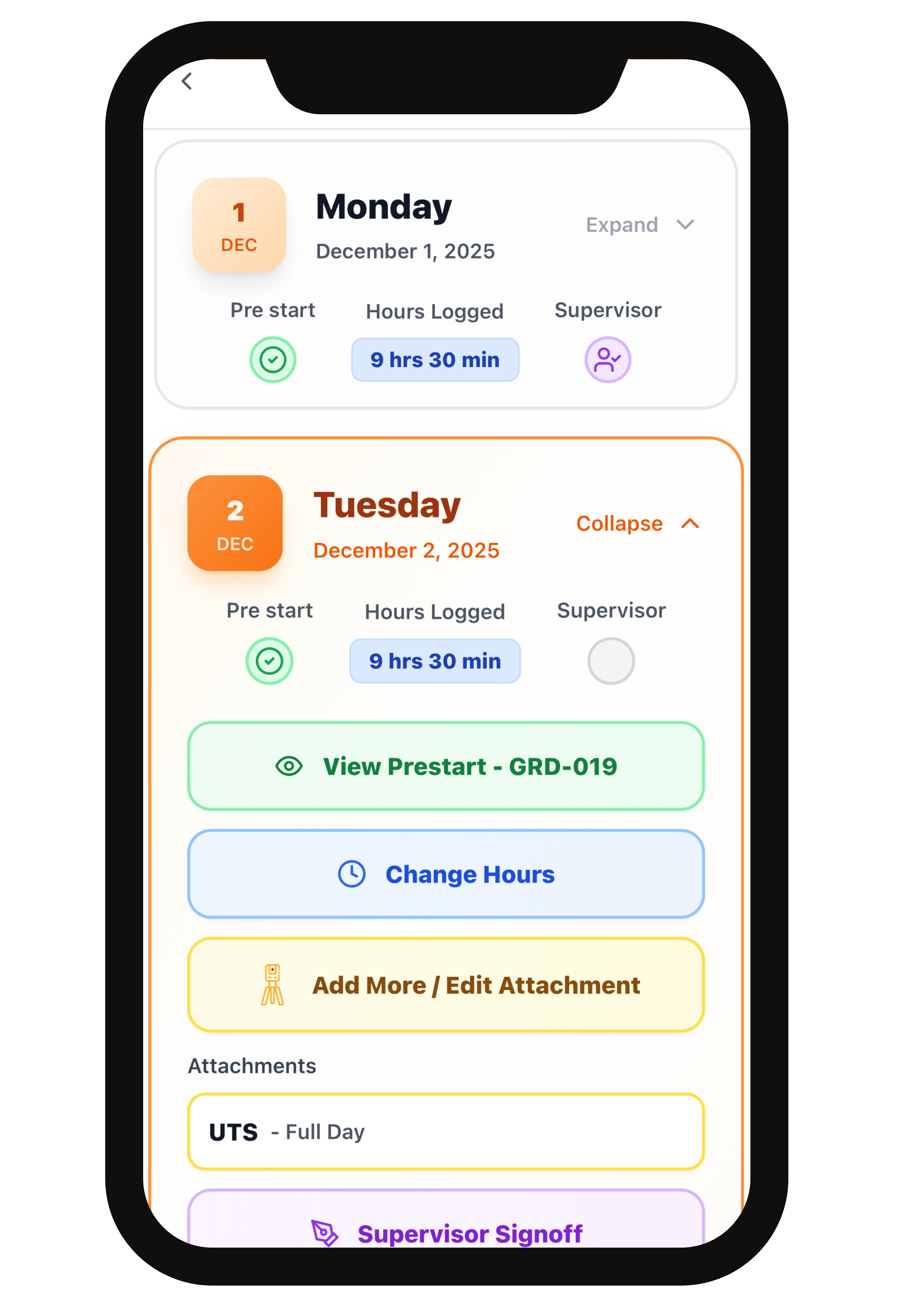
The CivDocs Logbook is the single source of truth for everything that happens on your machines each day. It's where operators record what they used, how long they worked, and which job it was for — and supervisors sign off before it becomes final.
Everything is timestamped, recorded on site, and locked in once approved. No backdating. No guessing. No missing hours.
Ready to ditch the paper logbook?
Start Free Trial →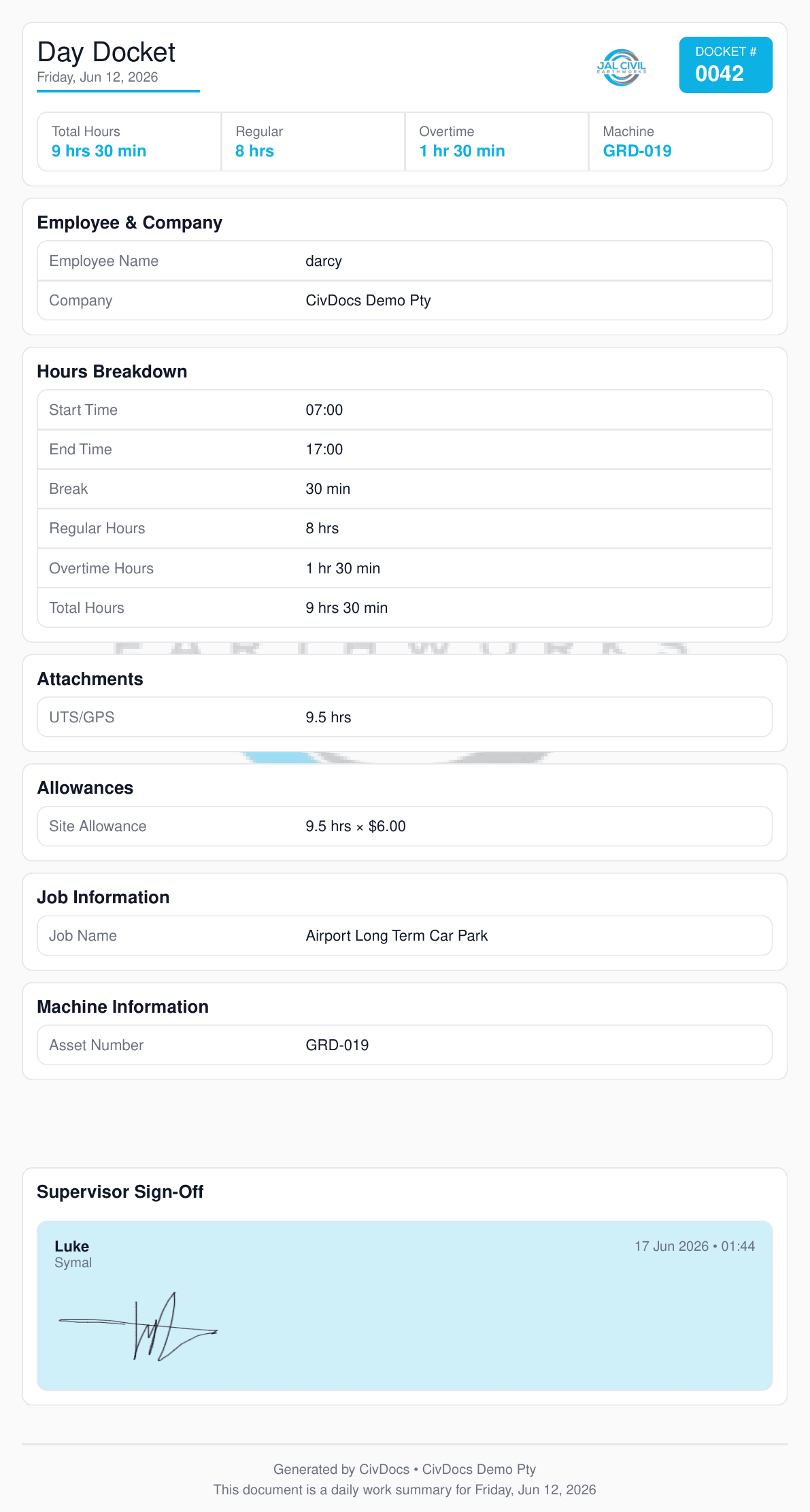
When a logbook entry is approved, CivDocs automatically generates this Day Docket PDF and emails it to your client — no manual work on your end.
In this example, darcy worked 9 hrs 30 min on GRD-019 at Airport Long Term Car Park, including 1 hr 30 min overtime and site allowances. Supervisor Luke signed off on 17 Jun 2026, locking the record.
Your client gets the exact document you see here — a clear, daily record of what happened on site before the invoice arrives.
See how Day Dockets work in your business.
Start Free Trial →When an operator fills in their logbook and the supervisor signs off, those hours — including overtime and allowances — are automatically sent to Xero as a draft pay run. Your payroll team reviews it, makes any changes they need, and approves. That's it.
No re-entering hours. No cross-referencing timesheets. No chasing anyone.
Hours, overtime, attachments and allowances are recorded in the logbook — all from the operator's phone.
The moment the supervisor approves, CivDocs automatically pushes a draft pay run to Xero — no one in the office needs to touch it.
Payroll reviews the draft in Xero, makes any adjustments, and approves. Everything is already calculated — they're just checking it.
Set the overtime rules once per employee — time-and-a-half after 8 hours, double time after that, whatever your EBA says. From then on, CivDocs applies the right rates every time without anyone having to check.
Overtime hours are broken out separately in the logbook and in the Xero pay run, so your payroll team always knows exactly what they're approving.
Regular hours
Straight time — captured and pushed automatically
Overtime hours
Calculated from rules set per employee
Custom earnings
Inclement weather, RDO, night shift
CFMEU Awards
Generic payroll apps don't know what site allowance is. CivDocs was built for civil construction — so CFMEU allowances are calculated on the job, not manually added by your admin team at the end of the week.
Automatically calculated based on the job and hours worked. No admin input required — it's already on the pay run.
Triggered automatically once an employee works past the threshold hours on the job. Nothing to remember.
Employees get their travel allowance applied per day worked. Pushes straight through to the Xero draft — no spreadsheet needed.
Stop re-entering hours into Xero every week.
Start Free Trial →Before CivDocs, scheduling meant a whiteboard no-one else could see, a flurry of phone calls every morning, and a fleet of machines you weren't completely sure where they were.
Now it's drag, drop, confirm — and CivDocs handles the rest.
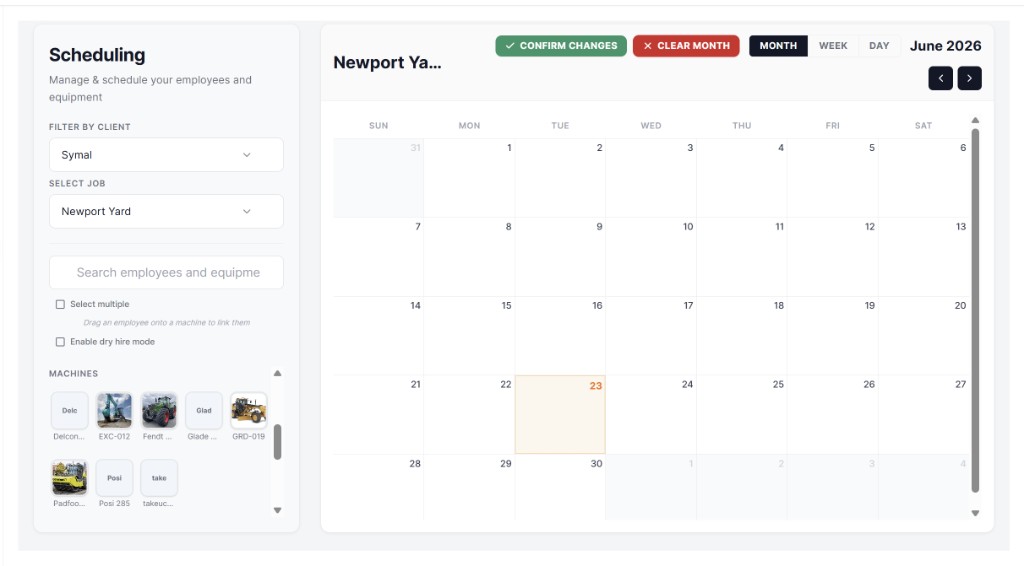
Drag and drop — machines and employees
Put any employee or machine onto a job by dragging them onto the calendar. Link an operator directly to a machine. Schedule across the month, the week, or right down to the day.
CivDocs messages them automatically
The moment you confirm changes, CivDocs sends the employee an SMS with their start time, a Google Maps pin to the job location, and the supervisor's name and phone number. No calls. No "did you get the message?"
Dry hire — straight to invoicing
Scheduling a machine or attachment on a job adds it to the job's revenue automatically. When invoicing time comes, the dry hire charges are already there — nothing to re-enter.
Plan the whole fleet a month out. See who's on what job and spot gaps before they become problems.
Fine-tune the week. Move people and machines around as jobs shift — without any phone calls.
Drill into a single day. Perfect for busy sites with multiple crews and machines running at once.
Put your whole fleet on the right jobs — in minutes.
Start Free Trial →Machine Compliance
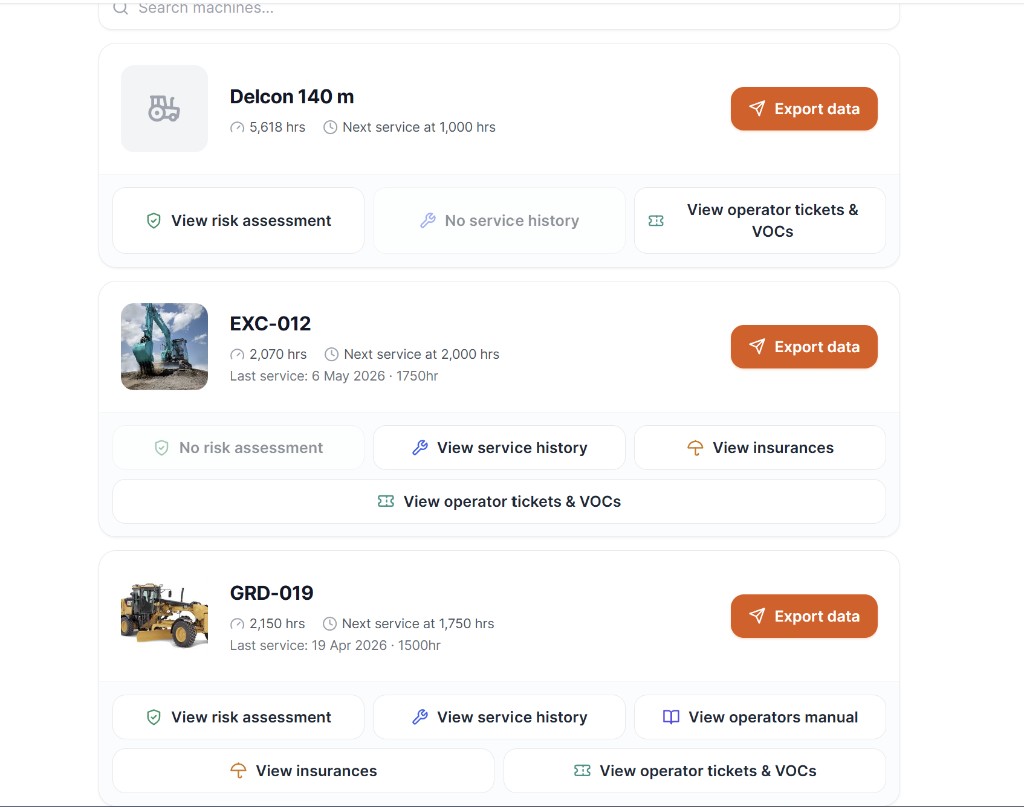
Store risk assessments, service history, operator manuals, insurance certificates, and operator tickets against each machine in CivDocs. When an engineer, project manager, or supervisor needs to see them, you send a link in seconds — no Dropbox hunting, no email chains.
Your machine library
What the recipient sees
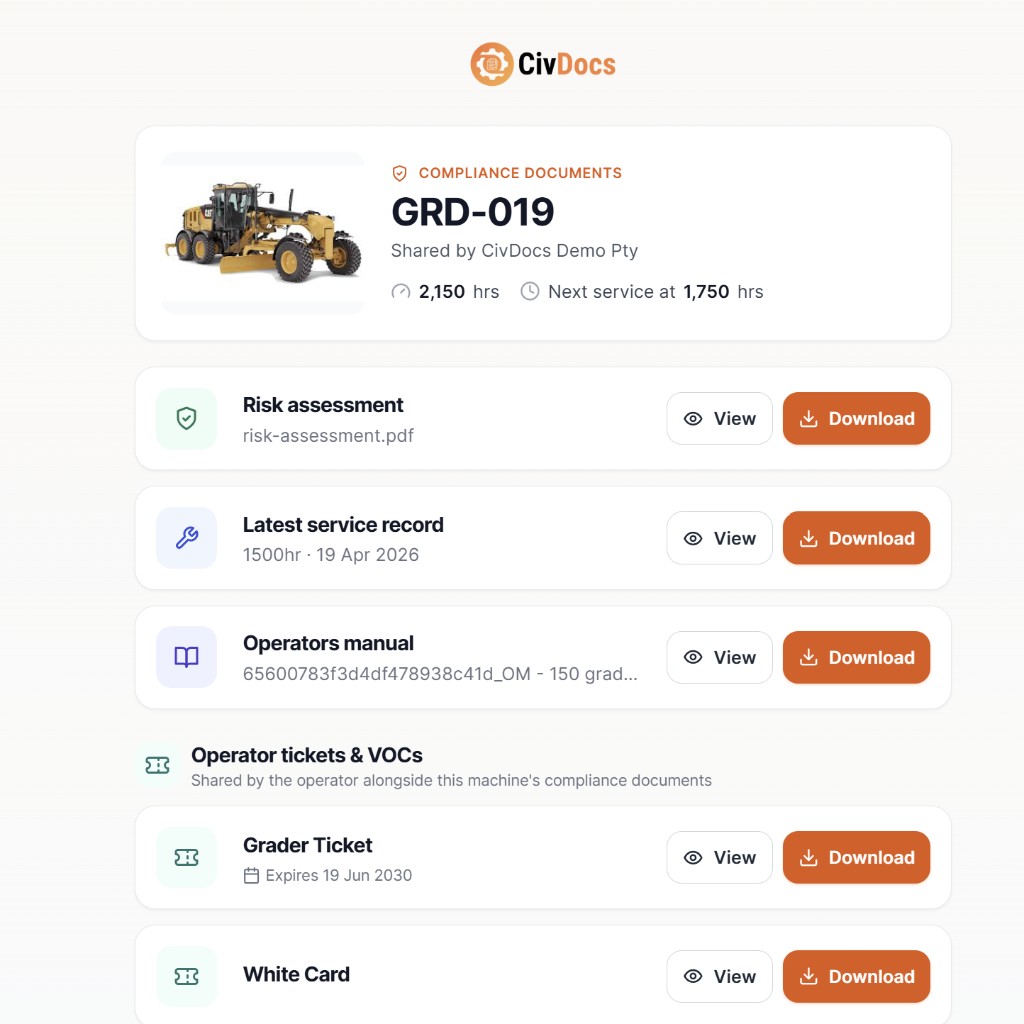
Risk assessment, service history, operator manual, insurances, and operator tickets & VOCs — all attached directly to the machine in CivDocs.
CivDocs includes a free risk assessment generator. Build one in minutes and attach it straight to the machine.
Generate a free risk assessment →Hit "Export data", enter a name and email or phone number, and CivDocs sends them a link. They can view and download everything — no CivDocs account needed.
The recipient gets a clean, branded compliance page with all documents available to view or download. Nothing to install. Nothing to log into.
No more hunting through shared drives to find the right service record for the right machine and forwarding it manually. It's already there — one link covers everything.
Your client or engineer gets a clean, well-presented compliance pack with your company name. First impressions matter on Tier One sites.
Keep all your compliance documents in one place — ready to share instantly.
Start Free Trial →Stop fighting with paper logbooks and spreadsheets at the end of every month. CivDocs gives you one clean, trusted record of every machine hour — and billing that actually matches what happened on site.
No credit card required. See how the logbook works in your business within 5 minutes.